For organizers
Coordinate volunteers without becoming the switchboard.
Volunteer coordination usually ends the same way: one person holding every detail, every reminder, and every gap in their head. Lightwork splits that load — so the help keeps showing up, the people you serve keep their privacy, and you see a gap early enough to ask someone.
Coordinating help for people you know is free. The organization layer is what we charge for.
What it does
The coordinator’s job, shared out.
Nobody has to be the switchboard
Add trusted people as co-managers — on one ask, on a whole program, or across a group. Everyone sees the same picture, so the plan isn’t living in one person’s texts.
Coverage at a glance
For each job: when it was last done and by whom, who’s signed up next, and which upcoming dates still need a volunteer. The gaps are visible while there’s still time to fill them.
Volunteers claim the dates they can take
People see the next few dates and pick the ones that work. You watch the gaps fill in ahead of time instead of scrambling the day of.
Help that repeats without re-posting it
Set it up once — every week, the yard that needs mowing or the shift that needs filling shows up on its own. No re-posting, no reminders to write.
Serve people who never use the app
The people you help don’t need an account. You run the program on their behalf; they just get the help.
No program rests on one account
Share it with co-managers as you go. If an owner ever leaves, the group keeps its manager rather than losing the program with them.
Setting up a repeating program
From an idea to a program in four steps.
- 01
Create the program
Give it a name and a short description — “Mow the Johnsons’ yard,” “Saturday build shift.” Choose who can see it: your group, or anyone nearby.
- 02
Set the schedule
Pick how often it repeats and how many upcoming dates to open for sign-ups. Leave it open-ended, or end it on a date or after a set number of times.
- 03
Add the details
Add the site — an address, access notes, a contact — kept private until a volunteer claims a date. Add a few co-managers to help you run it.
- 04
Track coverage
Watch each date fill in. See who’s signed up, when each job was last done and by whom, and which upcoming dates still need a hand — early enough to ask.
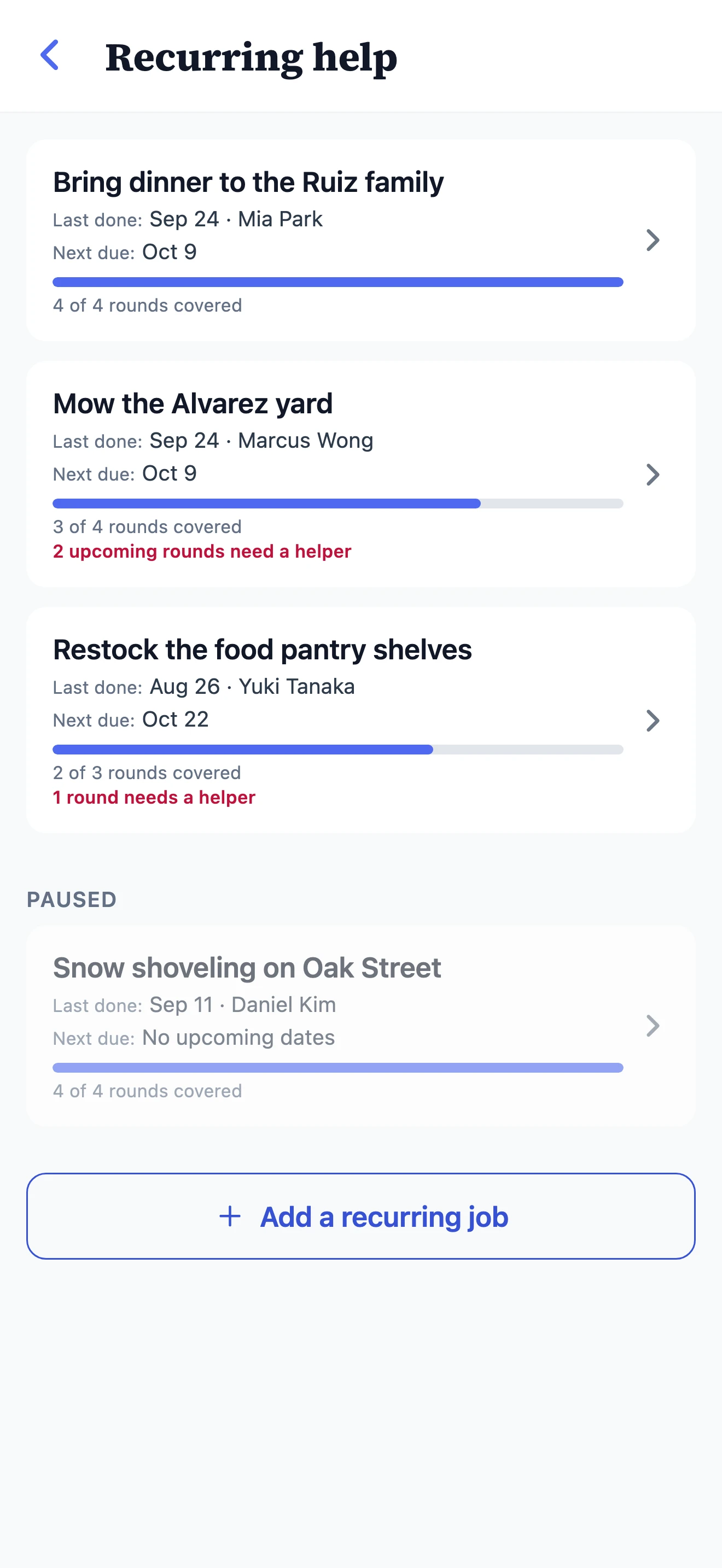
Coverage
See every round covered before the date arrives.
Each program shows when it was last done and by whom, when it comes around next, and how many upcoming dates still need a hand — early enough to ask. Pause one for the off-season and its history stays put.
Privacy
The people you serve keep their privacy.
Details unlock when someone signs up
The address, gate code, and contact for a home you serve stay hidden until a volunteer claims that date. Then only that volunteer can see them.
Roughly where, not exactly whose door
Everyone else sees an approximate location — enough to judge whether the trip works for them, without broadcasting anyone’s doorstep.
No account for the person being helped
You can ask on someone’s behalf. They never download anything, never sign up, and never appear in a directory.
Anyone can ask anonymously
An anonymous ask stays anonymous everywhere it travels — notifications, share links, search, the chat on the ask itself. Their name appears only if they choose to share it.
You choose the audience
Keep an ask inside your group, or open it to neighbors nearby. Sensitive needs never have to leave the room they belong in.
Tools for when something goes wrong
Report an ask, block a person, and remove a message on your own program. You’re not stuck hoping it sorts itself out.
Getting found
When someone goes looking to help, be there.
We’re new, so we won’t promise you a crowd. What we can do is make sure a willing volunteer has somewhere real to land when they go looking — and that it’s you.
A profile people can find
Your organization gets a page in the directory, with your locations — shown first to people searching close by.
Standing needs, always visible
If you always need volunteers, say so once. It shows up for people nearby who are looking for somewhere to start.
Your name on the help you sponsor
Asks posted on your organization’s behalf carry a verified badge. It’s checked by us, and it disappears the moment it shouldn’t be there.
Pages built to be found
Public asks appear on a page for their city that search engines can read without running any code — so a person searching for somewhere to volunteer can land on real, current needs.
A public page for your group
Opt in and your group gets a page you can share as one link. It shows what you’re about and how many people are in it — never who they are.
Every ask is shareable
Each ask and group has a link with a preview card, so it looks right in a bulletin, a text thread, or a post.
Questions coordinators ask
The practical answers.
Is Lightwork free for coordinating a group?
Yes. Everything one person needs to keep a meal train, a mowing rota, or a care team going is free: invites, co-managers, a repeating schedule, and coverage you can see before a date arrives. You can run as many groups and as many repeating programs as you like without paying.
Can I set up help that repeats without re-posting it every week?
Yes, and it is free. Set a program up once — the yard that needs mowing, the shift that needs filling — and each upcoming date appears on its own. Volunteers claim the dates that work for them, so you watch the gaps fill ahead of time instead of scrambling the day of.
Do the people we help have to download the app?
No. You can run a program on someone’s behalf, so the person receiving help never has to install anything or sign up. Their address, contact details, and access notes stay hidden until a helper signs up for that date — and then only that helper can see them.
Can I share the coordinating work with someone else?
Yes. Add trusted people as co-managers — on one ask, on a whole program, or across a group — and everyone sees the same picture, so the plan is not living in one person’s texts. If an owner ever leaves, the group keeps its manager rather than losing the program with them.
How is this different from a sign-up sheet or a group chat?
A sign-up sheet covers one event and then it is over; a group chat has no shared state, so you become the switchboard answering who has got Thursday. Here each ask stands on its own, coverage is visible to everyone, and the group outlasts the event — the next thing goes in the same place.
When would our group need the paid organization layer?
Only when you need to account for the help to someone outside it. If a funder, a board, or a denomination asks who served and for how long, or you want one certified identity and a verified badge across every group you run, that is the organization layer. Coordinating itself stays free.
One person can keep a whole program going.
Share the load, see the gaps early, and let the help show up on its own.